We have updated the 1TWO1 Digital Starter Kit! The updates include new websites for use in your classrooms as well as a new "quick view" sheet you can print off and keep handy. The list you are accustomed to starts on page 4 of the 1TWO1 Digital Starter Kit.
Remember this is just a place to start with digital projects!
Showing posts with label 1TWO1. Show all posts
Showing posts with label 1TWO1. Show all posts
Monday, July 28, 2014

Friday, April 4, 2014
Friday, September 27, 2013
1TWO1 Site Visit
Richland Two welcomed 50 visitors from various states as they came to learn all about our 1TWO1 Initiative. The morning started with an overview of our district. The visitors had the opportunity to visit a high school, middle school and elementary school to see how students are integrating technology. Breakout sessions were available for the visitors to listen and learn about our district's professional development opportunities and the technical side to our initiative. The day ended with a teacher panel for the visitors to ask questions to students, teachers, and instructional technology specialists.


Monday, July 29, 2013
Start your school year off with the Digital Starter Kit
Teachers you have asked for resources and places to start for projects and assignments. Well, here you have it. Last year a team of your colleagues worked with the District 1TWO1 Strategic Planning committee to create this wonderful resource. The District 1TWO1 Digital Starter Kit is here to help you design technology rich lessons.
This list is NOT a comprehensive list but a great starting point if you want to try something new. You can be assured that all of the links on this list are also OPEN and available to students.
With this list, we have some NEW additions of sites available district wide for teachers and students. All of which can be accessed from your Google Apps Account.
 1. Voice Thread- VoiceThread is a cloud application, so there is no software to install. The only system requirement is an up-to-date version of Adobe Flash. VoiceThread will work in any modern web browser and on almost any internet connection. Upload, share and discuss documents, presentations, images, audio files and videos. Over 50 different types of media can be used in a VoiceThread. Comment on VoiceThread slides using one of five powerful commenting options: microphone, webcam, text, phone, and audio-file upload. Keep a VoiceThread private, share it with specific people, or open it up to the entire world. VoiceThread can also be accessed through the iPad app.
 2. Lucid Chart - Collaborative tool to make flow charts, diagrams,mind maps, etc. Integrates with Google Drive. Free account features: Drag and drop simplicity, Extensive shape library, Real-time collaboration. Use your Google Login to access your account.


3. WeVideo - Online collaborative video editing platform. Integrates with Google Drive. More information will be forthcoming on how to access the district license of WeVideo.
Some other sites to highlight:
1. Educlipper - Have you been looking for Pinterest for education? Well, now it is here. Educlipper allows you to create a teacher account and students can create student accounts. Pin away with educlipper!
2. Padlet - Padlet is an Internet application that allows people to express their thoughts on a common topic easily. It works like an online sheet of paper where people can put any content (e.g. images, videos, documents, text) anywhere on the page, together with anyone, from any device. It's a great way to have student brainstorm, comment, or ask questions on any given topic.
Take some time and look over this list. I assure you soon your head will be bursting with great ideas of integrating new and engaging activities in your classroom.
This list is NOT a comprehensive list but a great starting point if you want to try something new. You can be assured that all of the links on this list are also OPEN and available to students.
With this list, we have some NEW additions of sites available district wide for teachers and students. All of which can be accessed from your Google Apps Account.
1. Voice Thread- VoiceThread is a cloud application, so there is no software to install. The only system requirement is an up-to-date version of Adobe Flash. VoiceThread will work in any modern web browser and on almost any internet connection. Upload, share and discuss documents, presentations, images, audio files and videos. Over 50 different types of media can be used in a VoiceThread. Comment on VoiceThread slides using one of five powerful commenting options: microphone, webcam, text, phone, and audio-file upload. Keep a VoiceThread private, share it with specific people, or open it up to the entire world. VoiceThread can also be accessed through the iPad app. 2. Lucid Chart - Collaborative tool to make flow charts, diagrams,mind maps, etc. Integrates with Google Drive. Free account features: Drag and drop simplicity, Extensive shape library, Real-time collaboration. Use your Google Login to access your account.
To access VoiceThread or Lucid Chart please login to your Google Apps Account and from the black navigation bar at the top, click on More and select the application you would like to use.
3. WeVideo - Online collaborative video editing platform. Integrates with Google Drive. More information will be forthcoming on how to access the district license of WeVideo.
Some other sites to highlight:
1. Educlipper - Have you been looking for Pinterest for education? Well, now it is here. Educlipper allows you to create a teacher account and students can create student accounts. Pin away with educlipper!
2. Padlet - Padlet is an Internet application that allows people to express their thoughts on a common topic easily. It works like an online sheet of paper where people can put any content (e.g. images, videos, documents, text) anywhere on the page, together with anyone, from any device. It's a great way to have student brainstorm, comment, or ask questions on any given topic.
Take some time and look over this list. I assure you soon your head will be bursting with great ideas of integrating new and engaging activities in your classroom.
Wednesday, April 24, 2013
Technology Spotlight - Mary Kathryn Burbank, Bridge Creek Elementary

Mary Kathryn Burbank is the music teacher at Bridge Creek Elementary School. She has been teaching for fourteen years, and this is her third in Richland School District Two. Students in her classroom learn music through the Orff Schulwerk approach, which is based on things children naturally do: sing, chant rhymes, move, and play. The students hear and experience the music first, and learn to read and write it later.
Mary Kathryn wanted to find a way to incorporate reading and writing music with technology. After becoming acquainted with a site called Noteflight at a music inservice, she realized it was the tool she needed. Fourth and fifth grade students in her classroom practiced improvising melodies on barred percussion instruments, including xylophones and glockenspiels. They brought their Chromebooks to the music room for many weeks, collaborating to create patterns that worked well together and plotting those notes on the music staff in the Noteflight site.

One recent composition sounded mysterious and eerie to a particular 5th grade class, so they entitled it "Zombie Turkey." They added an accompaniment pattern and the school's steel band transferred it to their instruments. The steel band students created a middle section for improvised solos and performed it at the recent spring concert, allowing the technology used to travel full-circle.

Zombie Turkey was enjoyed by all who were involved in its creation, and it exists because of technology and 1TWO1 computing.

*If you would like to nominate someone for a technology spotlight, please contact your Instructional Technology Specialist.
Wednesday, March 13, 2013
School 1TWO1 Spotlight - Spring Valley High School
*Guest blogger, Rob Herron, Spring Valley High School Assistant Principal tells us a little about how Spring Valley is transitioning to 1TWO1.


Spring Valley has changed how we are communicating all of the wonderful things going on. We used to send out a static, monthly PDF attachment called Viking Update. Now we use Blogger. Parents can follow the Viking Update via email or they can read it online. It’s been pretty popular. Here is a promo video we made about Viking Update. We also Tweet everything that we put out on the blog, and much of it ends up on Facebook as well. The blog has had over 12,000 page views in the past 2 ½ months. Last week we added a Spring Valley YouTube channel, and we put our daily in-house news program on the channel, and that’s linked to the blog, so we hope that encourages even more people to view the blog.
The QIT has definitively guided some of the dialog that we have had with members of our school-level technology advisory board. It’s caused us to reflect upon much of what we have done, and to think about what needs to still be done. It’s helped ensure that we have an adequate number of representative stakeholders involved in the conversation.

Over the last 2 years, Spring Valley High has prepared for the full school 1TWO1 roll out, what are some practices your faculty, staff, and administration have started to help move towards school wide 1TWO1?

Spring Valley has really done a great deal in a relatively short period of time. We have a new Principal, Dr. Baron Davis, who is really committed to using technology in a variety of ways. Of course, the major effort underway is training our teachers to use technology in appropriate ways that increase student interest in what they are being taught, thus increasing their level of engagement with the material, and ultimately enhancing learning. We have a lot of really excellent teachers who didn’t need much coaching or instruction. And we have some folks who desired a bit training. We’ve offered a lot of it. During the second semester, for example, Debbie Easler (Media Specialist) and Jason Paddock (ITS) are offering sessions on different topics every Wednesday. Teachers can select the sessions that most appeal or apply to them. The classes are offered every period of the day to make it easy for a teacher to attend. Debbie and Jason have really gone above and beyond in providing relevant training tailored to meet the needs of our teachers.
We added a Quick Link on our website that we’re calling “1TWO1 in Practice” where we are showcasing student work that could not be easily produced without the 1TWO1 initiative. The work we will showcase will be great things are students are doing in their classes, with technology, but not just for technology’s sake. The work chosen will be at least at the Modification level on the SAMR model.

Spring Valley is doing lot with technology in other ways as well. The move to Google has opened a lot of opportunities in terms of the ease with which a school or its teachers can communicate information to students, their parents, or the community. Google Sites is an example. We’ve made a big move into Sites as they are relatively easy to set up and afford teachers unprecedented ease in communicating information about their courses. This year we've required all of our teachers to have a basic Google Site for the courses they teach. The site must contain their contact information, course syllabus, lesson plans, and a Google Calendar with assignments from their courses. Parents can subscribe to the calendars and have information about upcoming quizzes, tests, and the like delivered to them. We did a lot of training at the end of last school year, and over the summer, and in the first week of school, to help the teachers get their sites up and running. It’s been very collaborative. The decision to require teachers to have a site really helped teachers learn Google Apps, and aside from the improvement in communication with parents, that was the real goal. You can view any of our teacher’s Google Sites from the staff directory on the SVHS website. If anyone is interested in learning how to create a Google Site they are more than welcome to use some of the resources we created (here or here).
We've also moved to using Google Forms for our administrative walk through observations this year, and that's a big improvement. Google Forms allows us to create a single database shared among the members of the administrative team. Having all of the observation data in a single database is really powerful, and much more useful than an electronic file folder of a few hundred individual files (i.e. each walk through for each teacher). Before we moved our walk through to Google Forms someone would have to have opened and read 500 documents to figure that out. A demo version of our form is available for you to see along with the backend spreadsheet.
How has the District Quality Implementation Tool (QIT) helped with this transition?
The QIT has definitively guided some of the dialog that we have had with members of our school-level technology advisory board. It’s caused us to reflect upon much of what we have done, and to think about what needs to still be done. It’s helped ensure that we have an adequate number of representative stakeholders involved in the conversation.
How does Spring Valley High communicate what is going on with 1TWO1 with your stakeholders, primarily parents and the community?

Thus far our major method of communicating some of what’s been going on with 1TWO1 at SVHS is via the web. As I mentioned above, Spring Valley has made a big leap forward this year in how we are using available technologies like Google Sites and Blogger to help inform our parents and public. We have over a hundred teachers individually telling their stakeholders what is going on in their classes everyday via their websites. In years past some sites were little more than a place a parent might find a teacher’s phone extension. So while the web itself is hardly revolutionary at this point, the way we are utilizing it, and the number of people who are utilizing it, has changed monumentally.
We’ve made a big move to web tools with products like Blogger and Twitter. Parents can simply subscribe to our feeds and the information comes to them. We’re trying to make it is easy as possible for them to stay abreast of things going on at Spring Valley High School.
We have had several discussions about the 1TWO1 initiative with our School Improvement Council over the past two school years. I think those conversations have been really productive in that they allayed some concerns that some parents had. Change is frequently met with a lot of questions. The resulting dialogue between school officials, our teachers, and our parents was really good, and parents clearly understood that we were not just going to hand out Chromebooks and leave the students to their own devices.
We have done a fair amount to help the parents with some of this technology. We had a “Google Parent Night” as part of Open House where parents could go and sit down with an ITS and learn how, for example, to subscribe to a teacher’s Google Calendar. Once parents see how easy it is they love it. We even made a how-to video for the parents which many of our teachers put on their sites.
How has professional development/learning played a roll in the 1TWO1 transition?
You could not accomplish the things we have without providing professional development opportunities for the faculty. Jason Paddock and Debbie Easler, and others, have worked tirelessly for the past two school years providing dozens of sessions on various 1TWO1 topics. The work they have done has taken a lot of the potential trepidation out of something like moving into a one-to-one computing environment in every classroom. Though it would have been nice to have a Chromebook for every student from day one, the school truly benefited from the gradual roll out. It gave us a lot of time to plan, train, reflect, amend our plans, re-train, etc. It also gave us the opportunity to tap into the power of our faculty. Those who got the devices in their classrooms first were a great resources in helping train the groups who got them subsequently. We used a “train-the-trainers” approach in some respects, and that helped a lot.
One thing we’re doing right now is providing optional, weekly staff development opportunities every period of the day every Wednesday during Semester Two. We are asking our teachers to select a minimum of four sessions over the course of the semester. Instead of mandating that teachers attend certain things, we are giving them the flexibility to select topics that appeal and apply to them.
If you are an administrator and would like us to spotlight your school's 1TWO1 implementation, please contact MaryAnn Sansonetti-Wood
Monday, March 4, 2013
SAMR Contest for Teachers at Ridge View High!
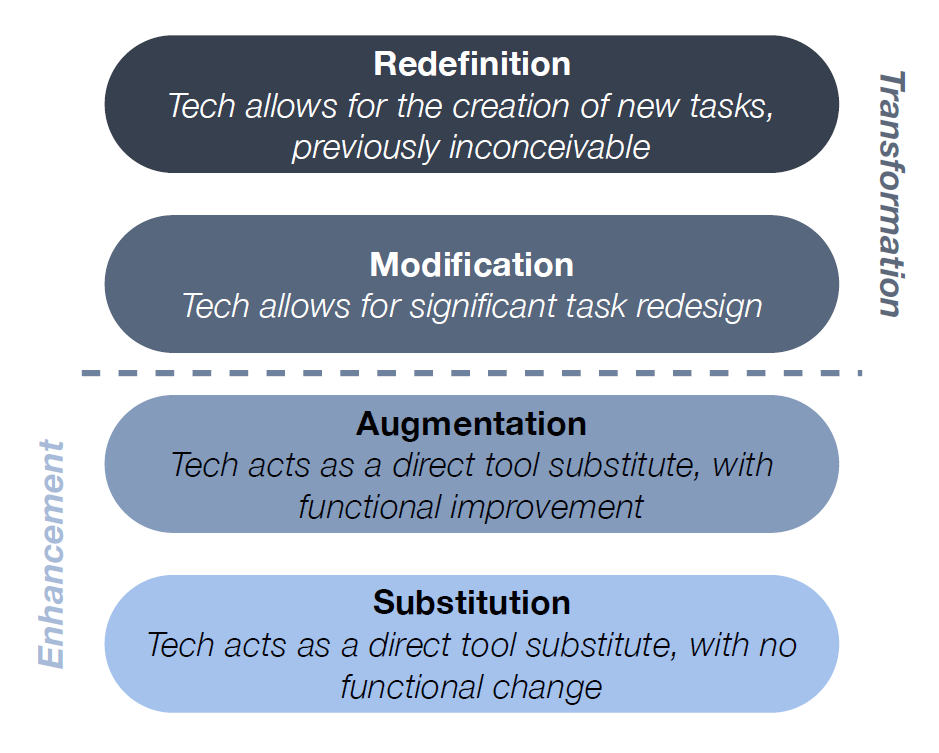
There are a few teachers at Ridge View High ROCKIN' new skins on their Chromebooks. Why, you ask? Teachers were asked to redesign a lesson plan based upon the SAMR learning model and submit the lessons for a chance to win a Chromebook cover. Winners went beyond simply substituting technology for another tool; they modified their lessons to allow for tasks that were inconceivable before technology. The lessons were examples of some of the great teaching and learning Ridge View is seeing this year.
What is SAMR?


What is SAMR?
SAMR, a model designed to help educators integrate technology into teaching and learning , was developed by Dr. Ruben Puentedura. The model aims to enable teachers to design, develop, and integrate digital learning experiences that utilize technology to transform learning experiences to lead to high levels of achievement for students. Summer Technology Institute Blog
Congratulations
transforming their lessons with technology.

Thank you to Tami Lenker, the Ridge View ITS, for sharing this wonderful idea!
Subscribe to:
Comments (Atom)